
How do you reuse the same AI model for product photos?
In sameface, a saved model has a locked face reference. Selecting that model for another look starts the next generation from the same face reference. This gives you a repeatable starting point across products, settings and later creative sessions.
The reference is an input, not a promise of identical output. Facial details, pose, hair, hands and the product itself can vary between images. The merchant still decides whether a result is suitable for the store. This is AI product imagery, not evidence of a real person wearing or endorsing an item.
Build a repeatable product-photo workflow
- Start with one model reference. Choose the saved AI model you want to use for your collection.
- Keep a look you like. Choose a setting that suits the products. Save the look so you can come back to it.
- Change the product deliberately. Select the next catalog item and reuse the model reference. Keep the setting similar when comparing results.
- Review the face and the product separately. A familiar-looking face can still appear alongside an inaccurate logo, neckline or product shape.
- Publish only the selected outputs. Existing product media remains in place.
A studio, the outdoors, the same reference
Both examples below use Maya as the saved face reference and the same synthetic sweater. They show how changing the setting can produce a different shot, while the source face stays the same. They are examples, not a guarantee for every generation.
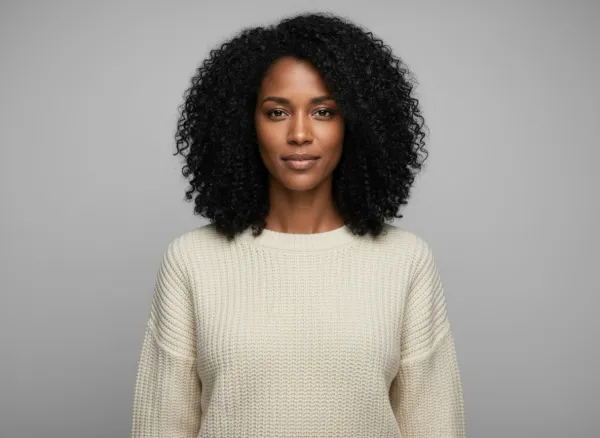
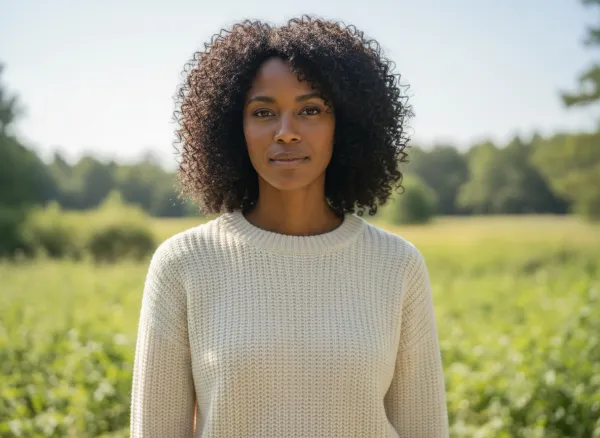
Try other products in the interactive sameface demo.
When is a reusable model useful?
A clothing merchant may want a recurring face across a knitwear collection; see your clothes on an AI model for the apparel workflow. A beauty merchant may want a similar presentation for several products. Reusing a reference can help make these creative choices repeatable without starting the model selection again each time.
For products where exact dimensions, fit or material finish matter, keep verified product photography alongside any AI-created scene. If a person distracts from the item, use a product-only photo. sameface supports both approaches.
Questions merchants ask
Does sameface guarantee the exact same face in every image?
No. The app reuses a locked face reference, but the generated result can still vary. Review facial and product details before publishing.
Can I save a look and return to it later?
Yes. A saved look lets you return to the chosen creative setup and use it for another run in the app.
Do model portraits use the free-image allowance?
Yes. Generated model portraits and scene previews count toward the 15 free images, alongside product photos. A free image that fails does not use up one of your fifteen, at most fifteen times. Paid photos are charged after they are made, and there are no refunds. See pricing and allowance details.