
Is Botika still on the Shopify App Store?
No. When we checked on , the Shopify App Store listing for Botika (apps.shopify.com/botika) said: "This app is not currently available on the Shopify App Store." It shows no install button, so a merchant cannot add it to a store from the App Store today.
Botika's own website is still online. This page is about the Shopify app, and about what to use inside Shopify instead.
What sameface does for on-model fashion photos
The job is the one you used Botika for: your garment, worn by a model, without booking a shoot. In sameface it works like this.
- Clothes on an AI model. The photo already on your Shopify product is the garment reference. A flat-lay or a packshot is enough, and there is nothing to upload.
- A model you keep. Pick a stock AI model or create your own, and lock its face as the reference, so a collection is shot on the same person. Small differences between shots can still happen, so review each one.
- Ghost mannequin. Tops and full outfits can be shot in a body's shape with nobody in it, the catalog look many clothing stores use.
- Studio or lifestyle. A plain studio background, or a scene such as a café, a street or a room at home.
- Sizes for ads. Square 1:1, 4:5 for feed ads and 9:16 for Reels and TikTok.
- A label check. After a photo is made, sameface reads the brand lettering on it and on your product photo, and tells you in the gallery when the two do not match.
- Publish to the product. You choose each photo to publish. It is added beside your existing product photos, and nothing is replaced.
One sweater, one AI model
These four images come from sameface's own sample library. The sweater is a synthetic product photo, and the app made the three model photos from it with its stock AI model Maya as the face reference. No real person and no real store's product appear in them.
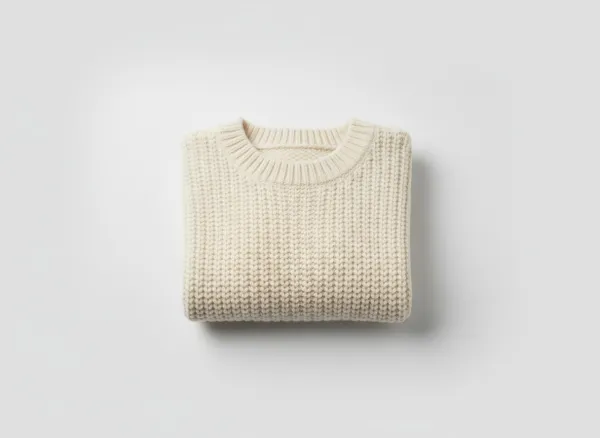
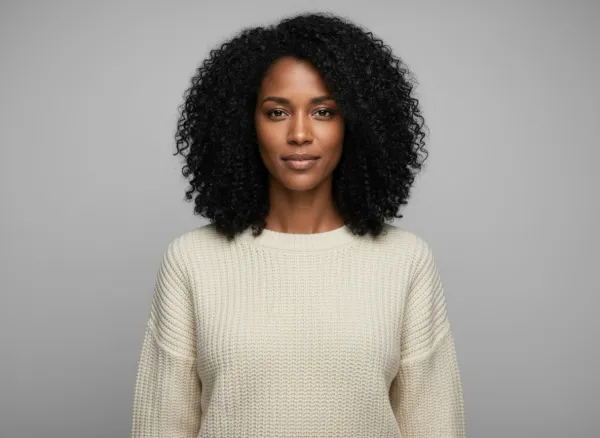

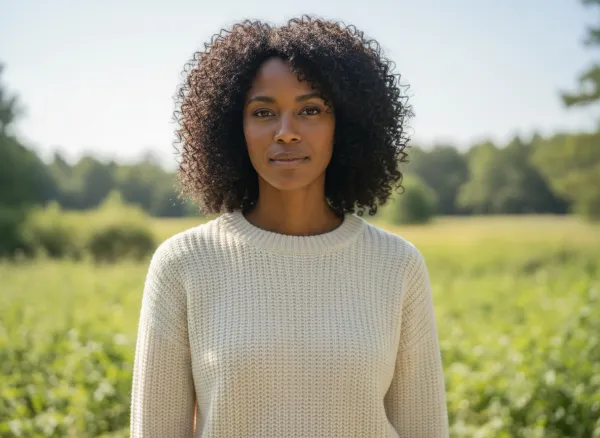
Fit and drape are drawn from a flat photo, so check them against the real garment. More apparel examples are on AI fashion model photos.
Where sameface is different
A few things are worth knowing before you switch.
- It works only inside Shopify. If you sell without a Shopify store, it does not fit.
- It is not a virtual try-on. Shoppers do not upload a photo of themselves; the app makes photos for your own product pages.
- It does not remove backgrounds or make white cut-outs. It makes new photos from the one you have.
- The model is an AI-generated person, not a real model, so do not present the photos as a customer or a real person wearing the item.
- You review every photo. AI can change a print, a logo or the fit, and nothing is published until you choose it.
What it costs
There is no subscription and no monthly plan. New stores get 15 free photos once. After that a photo is $0.08 USD, and a five- or ten-second clip made from a photo you approve is $0.14 a second, or $0.28 a second at best quality: a five-second standard clip is $0.70. Paid results go on your Shopify bill, under a usage cap you approve, $100 by default. The details are on the pricing page.
Moving your catalog over
- Install sameface from the Shopify App Store.
- Pick the products that need model photos. The photo already on each product is the reference.
- Choose a model or the ghost mannequin, then a scene and a size.
- See the price, then generate. The first 15 photos are free.
- Review and publish. Compare each result with the real garment and publish the ones you want.
Questions from Botika users
Is Botika still available on the Shopify App Store?
Not as of October 9, 2026. Its App Store listing says the app is not currently available on the Shopify App Store, and it shows no install button.
Do I need a subscription for sameface?
No. Your first 15 photos are free, then you pay $0.08 USD per photo on your Shopify bill, under a cap you approve.
Can I shoot a whole collection on the same model?
Yes. Lock a model's face as the reference and pick that model for each product. Details can still vary between shots, so review each photo.
Does sameface make ghost mannequin photos?
Yes, for tops and full outfits: the garment is shown in a body's shape with nobody in it.
Can shoppers try clothes on in my store?
No. sameface makes photos for your product pages. It has no shopper try-on.
Does it publish to my store automatically?
No. You choose each photo, and it is added beside your existing product photos.